RHEL AI fundamentals
Notes// archive From the original Code Walker docs. Kept for reference, so some versions and commands may be out of date.
Introduction to Generative AI#
GenAI presents a wide range of applications, which are broadly categorized into the following categories:
- Text generation
- Image and video generation
- Audio transcription and generation
Use Cases#
General-purpose content generation
Generating documents, articles, images, videos, audio, or music from a prompt. For multimodal models, the prompt might consist of different media types.
Conversational systems This is a subtype of language generation, focused on conversational human-computer interactions through either text or voice. Chat bots are a common use case in this category.
Reasoning and agents
Some large language models (LLMs) have the skills to interact with the outside world by using software tools when needed. These models are referred to as agents. By using tools and processing the response in an iterative manner, agents might be able to retrieve up-to-date information and emulate human thinking to produce more elaborate responses or interact with the outside world. Because this is an iterative process, it might incur an increased computational cost.
Code analysis and generation
LLMs trained on vast amounts of code can write and analyze code. These LLMs are used as assistants for developers to increment their productivity or find bugs.
Summarization
The ability of LLMs to analyze text semantics enables using LLMs for understanding and summarizing content.
Limitations and Challenges#
One significant challenge is the hallucination problem. A hallucination refers to the generation of incorrect responses generated in a confident way. This issue is inherent to the probabilistic nature of LLMs, and leads to frequent user concerns about the predictability, reliability, and consistency of LLMs.
Additionally, using third party GenAI model services might raise privacy concerns, and resorting to the company’s infrastructure might incur big costs on GPUs. In such cases, using smaller domain-specific models might make more sense. Also, you can use compressed or quantized versions of the model to reduce costs.
Organizations might also want to implement safety guardrails to prevent GenAI from producing harmful content or revealing sensitive information.
The Model Choice Process#
- Analyze your use case.
- Identify a list of candidates by searching for specialized models that align with your needs.
- Rank the selected models based on their attributes and suitability, considering infrastructure limitations.
- Evaluate whether the model behaves as desired.
- If necessary, iterate through the selection process to refine your choices.
Number of parameters#
Publicly available models often include the number of parameters in their names. This is a popular convention in many model hubs. For example:
The ibm-granite/granite-3.1-8b-base is a 8-billion-parameter base model.
The HuggingFaceTB/SmolLM-135M is a 135-million-parameter model.
Additionally, hubs such as Hugging Face provide search filters based on the number of parameters.
Number of Parameters#
Parameters are the internal variables that the model learned during its training phase. If you imagine an AI as a massive radio, the parameters are the billions of tiny knobs and sliders that have been tuned to just the right positions to make sense of data.
What they represent: They are the weights and biases (numerical values) that determine how much importance the model gives to specific pieces of information.
Scale: When you hear a model has “7 Billion” or “175 Billion” parameters, it refers to the complexity and storage capacity of that “brain.”
The Rule of Thumb: Generally, more parameters allow a model to understand more complex patterns and nuances, but they also require more memory (VRAM) and computing power to run.
Inference#
Inference is the execution phase. It is the process of the model actually using its trained “brain” to provide an answer to your prompt.
The Action: While “training” is the process of learning, “inference” is the process of applying that learning. When you ask a chatbot a question and it generates a response, it is “performing inference.”
Speed & Latency: This is where “tokens per second” come in. Since the model has to pass your input through all those billions of parameters to calculate the best output, the speed of inference depends on the hardware (GPU) and the size of the model.
Quantization#
Quantization is a technique that reduces the precision of model weights and activations.
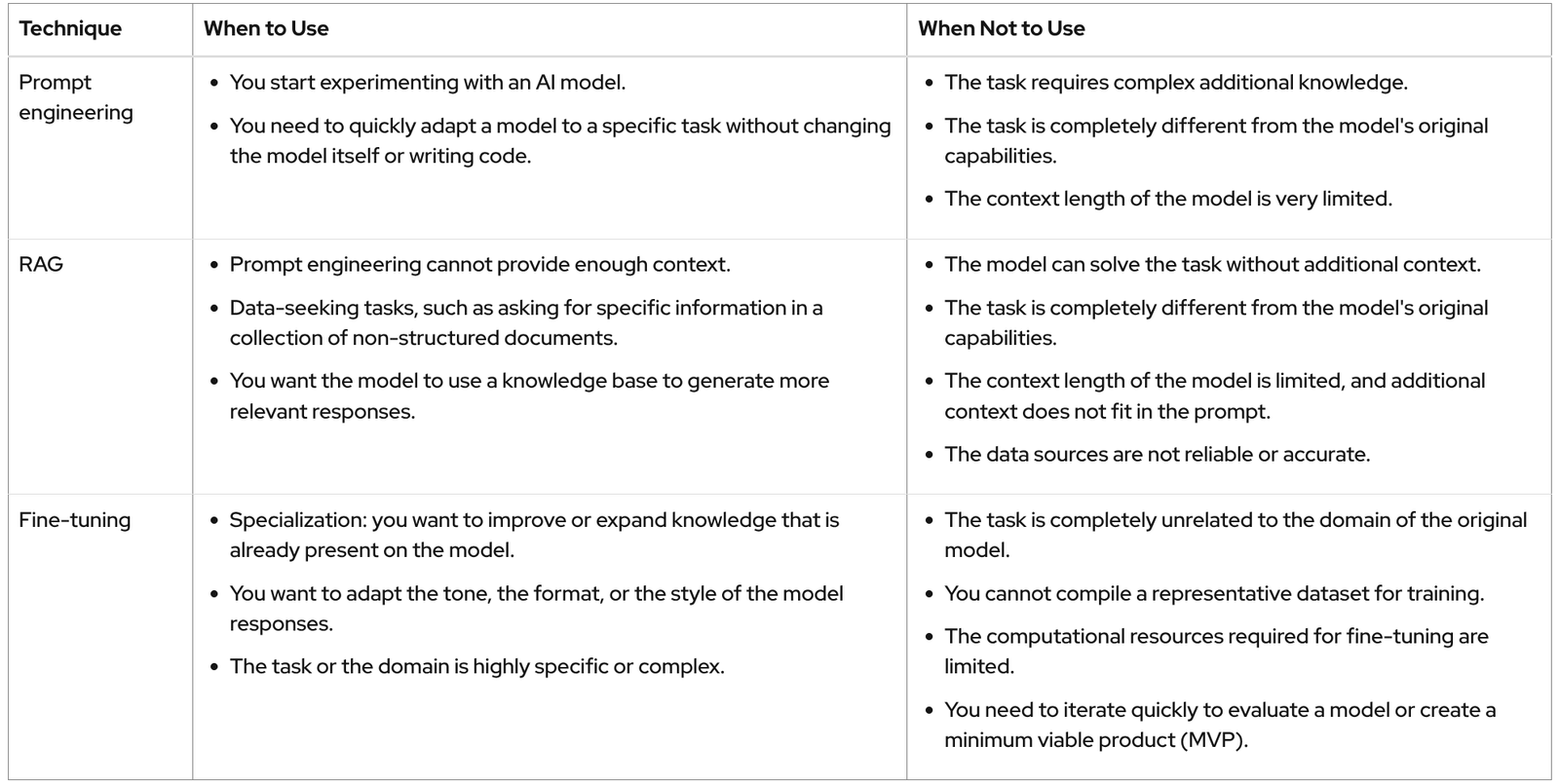
Model Adaptation Techniques#
- Prompt engineering
- Retrieval-augmented generation (RAG) (Tools = LangChain or Llama)
- Fine-tuning (Tools such as TensorFlow, PyTorch, or Transformers, to fine-tune models.
InstructLab is an open-source project designed to make it easier and cheaper to fine-tune Large Language Models (LLMs).)
RamaLama is an open-source command-line tool designed to “make AI boring.”
While that sounds like a negative, in the world of DevOps and software engineering, “boring” means stable, predictable, and easy to deploy. Developed largely by engineers at Red Hat (the same team behind Podman), it treats AI models like standard container images (OCI images).
Exercise notes#
ramalama run granite3.3:2bamalama run --temp 0 granite3.3:2b